Bustan e-Learning Platform
A professional eLearning platform for teachers and students — live sessions, schedules, attendance, class summaries and recording uploads, all in one focused, distraction-free interface.
Download for Windows bustan-elearning-setup.exeAvailable platforms
Windows
Available nowmacOS
Coming soonLinux
Coming soonAndroid
Coming sooniOS
Coming soonEverything you'd expect from a modern eLearning platform
Bustan brings classes, content, assessments, communication, and analytics together in one focused workspace built for teachers, students, and coordinators.
Live virtual classrooms
High-definition video, audio, screen sharing, and chat — start or join a class in a single click, attend from anywhere.
Schedules & calendars
A personal timetable of upcoming classes and tasks, with smart reminders before every session so nothing slips through.
Attendance & class summaries
Capture attendance, chapter progress, and teaching notes inline. Coordinators and admins get the full picture across batches.
Class recordings
Sessions are recorded automatically and uploaded in the background with resume support — students can revisit any class on demand.
Messaging & notifications
Direct messages between teachers, students, and parents, batch announcements, and in-app + system alerts you can tune per channel.
Role-based experience
Dedicated workflows for students, teachers, coordinators, academic heads, and admins — each role sees exactly the data and actions it needs.
Analytics & reports
Attendance trends, class summaries, and teaching activity exposed in clean dashboards so academic leadership can spot what needs attention.
Native desktop experience
Built as a true desktop app — fast launch, system-tray reminders, OS-level notifications, and a polished interface tuned for daily teaching.
Secure & private
Encrypted credential storage via the OS keychain, role-scoped data access, and no third-party trackers anywhere in the app.
See the features in action
A look at the day-to-day flows teachers, students, and coordinators use most. Click any image for a closer view.
Engaging live virtual classrooms
High-quality live sessions purpose-built for teaching. Cameras, screen sharing, in-class chat, and real-time attendance — all in one window, with no second-app juggling.
- HD video and clear audio with adaptive bandwidth.
- One-click screen sharing and interactive whiteboard.
- In-class chat and real-time attendance tracking.
- Sessions are recorded automatically and uploaded in the background.
Class summaries
Capture attendance, chapter progress, and teaching notes the moment a class ends. Coordinators get the full picture across every batch they oversee.
Tasks & assignments
Assign work to batches or individuals and track it through to completion. Students see what's due, what's done, and what's next — all in one place.
Messaging
Direct messages and batch announcements between teachers, students, and parents — with full conversation history, all inside the same app so nothing gets lost across email threads.
Class recordings
Every session is recorded and uploaded automatically with resume support. Students revisit any past class on demand; teachers can review their own delivery.
System requirements
The app runs on most modern Windows laptops. Recommended specs make live sessions and recording feel effortless.
Minimum
Recommended
A guided tour
Take a quick look at how teachers and students experience the platform day-to-day. Click any screenshot to view it full-size.
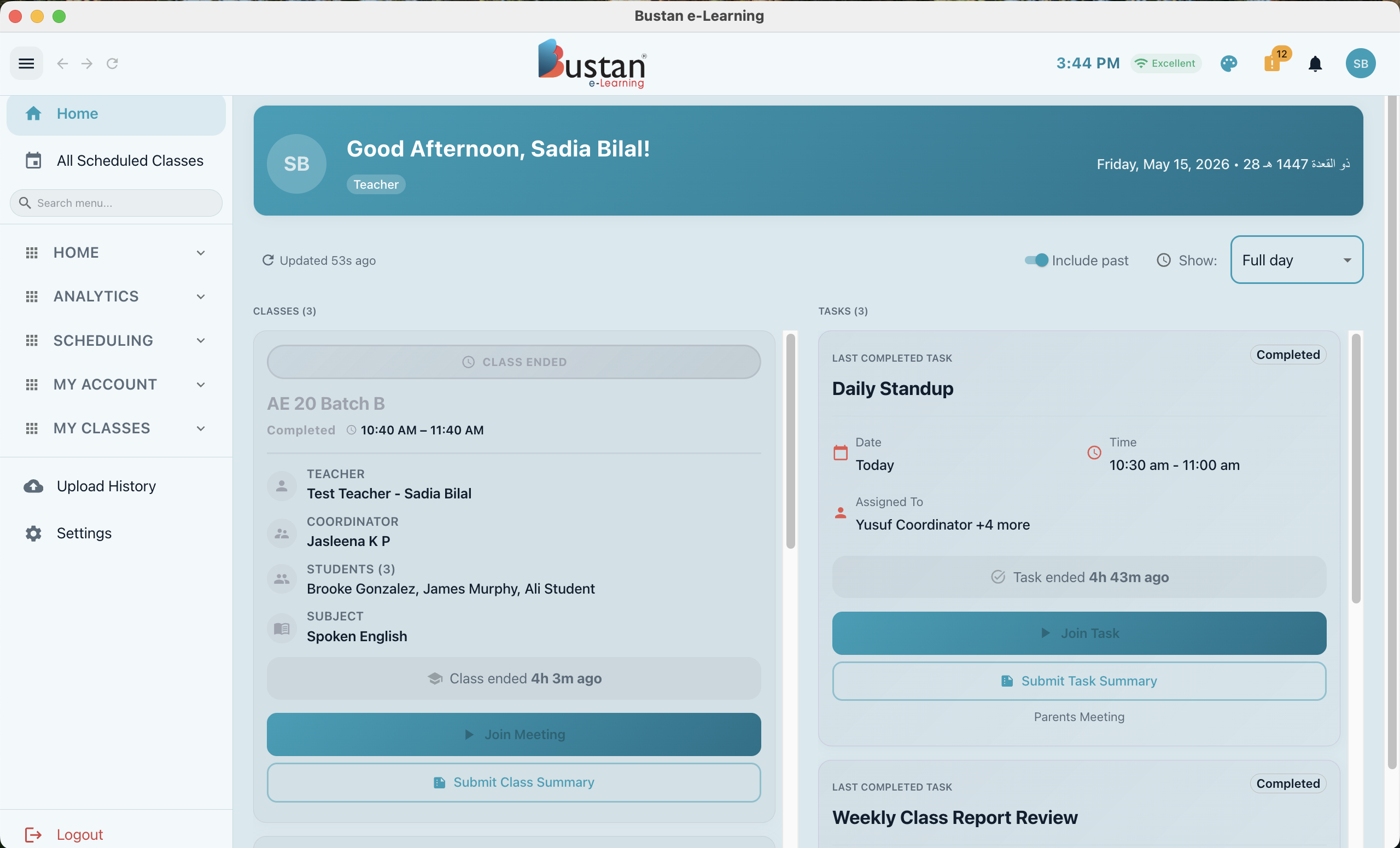
A personalised home dashboard
Every user signs in to a focused workspace tailored to their role. Teachers see today's classes and pending tasks. Students see their upcoming sessions and recent activity. Coordinators see the cohorts they oversee.
Click the image to enlarge.
Notifications that respect your focus
Every alert can be tuned — different chime for class reminders, messages, and late-join nudges — or muted entirely. The app stays quiet automatically while you're teaching.
Click the image to enlarge.
Professional virtual backgrounds
Look polished from any room. Pick one of the bundled classroom-friendly backgrounds or upload your own — your choice is applied automatically when you join a live session.
Click the image to enlarge.
How to install
Four steps from download to live class.
Download the installer
Click Download for Windows at the top of this page. The installer is about 25 MB and downloads in seconds on most connections.
Run bustan-elearning-setup.exe
Windows SmartScreen may show a "Windows protected your PC" prompt the first time. Click More info → Run anyway — the installer is signed but new signatures take time to build reputation.
Pick your install location
Defaults are fine for most users. If you prefer a custom path (e.g. a shared D: drive), you'll get the option on the next screen.
Sign in and you're set
Use the same email and password as your Bustan account. The app remembers you across restarts.
Need a hand?
Email us at info@bustanonline.com and we'll help you get up and running.
ustan